It remembers, then it helps.
Opsis is the AI assistant that follows your work across every app on your Mac or PC, then catches the slip, finds the file and drafts the next step, with the source attached.

3.1 Tensile test results
Figure 2 shows the stress strain curve for all three specimens. Each one yielded well before the ultimate tensile strength of 67 MPa.


Free to start. For Mac and Windows.
As seen in


Works across the apps you already use.
Native apps and the browser, on Mac and Windows. Nothing to install inside each one.




It starts by remembering.
Most AI tools wait for you to explain everything. Opsis was there when the work happened, so it already knows the brief, the thread and the decision.
Remembers
It keeps the thread.
Every session gets a plain name and a short summary, across every app you share. Weeks later, the reasoning behind a decision is still one search away.
Notices
It catches the slip.
When what you're writing clashes with something you read, agreed or promised, Opsis spots it and shows you where the right answer lives.
Moves it forward
It hands you the next step.
A reply that sets the right expectation, the file you were about to hunt for, a fix ready to insert. It all arrives in the app you're already in.
Quiet until it matters.
Useful when it does.
Opsis waits for the moment when one fact, one decision or one draft would save you from redoing work later. The rest of the time, it stays out of sight.
What's new in 1.0
A faster checkout, rebuilt from the ground up for mobile.
Order history loads twice as fast on older phones.
Working as usual
Work the way you already do.
Share the apps you want Opsis to follow. It builds the account of your work in the background, and most of the day you won't see it at all.
A small cue, only when it counts.
When there's one thing worth your attention, a cue appears beside your words. There are no pop ups or pings, and you can ignore it and keep typing.
See the source before you act.
Click the cue or tap the summon keys. The card tells you what to change, why, and exactly where that came from. The source is one click away.
Take the fix and keep going.
Insert the fix or the draft with one click. Nothing is written until you say so, and Undo is always there, so you stay the author.
Wherever the work happens.
Different jobs, the same slips: an old number, a decision you missed, a promise the data can't keep. Pick yours and watch Opsis catch it.
3.1 Tensile test results
Figure 2 shows the stress strain curve for all three specimens. Each one yielded well before the ultimate tensile strength of 67 MPa.
Ask anything, over any app.
Hold two keys and ask about what's in front of you. Opsis already knows the project, so you can skip the backstory.

Starts with what you're doing. The app in front of you is already in context, and you can switch it off per question.
Answers you can check. Every claim links back to the doc, thread or session it came from.
Gone when you're done.Press esc and you're right back where you were, with no tab to hunt for.
Every session, accounted for.
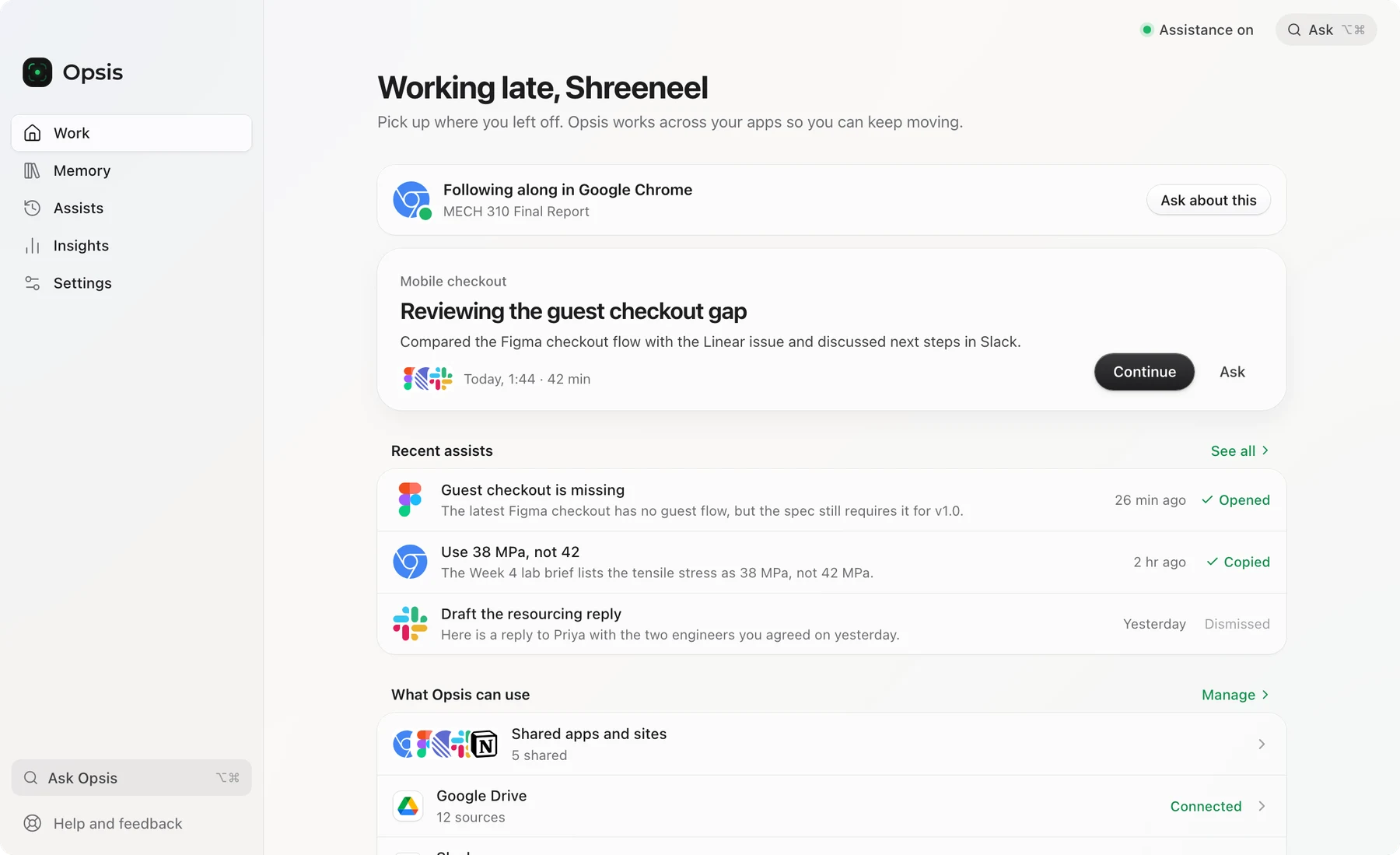
The Opsis app is where the account of your work lives: what you worked on, what Opsis noticed along the way, and the controls that keep it yours.
Swipe to explore the screen
Pick up where you left off.
Open Opsis and your last piece of work is waiting, with the apps it lived in and what's still open.
The apps you use will keep changing. The work you do carries on. Opsis keeps the account of it: what you did, what actually took the time, and what should happen next. Today that account helps you pick up the thread. In time, the people and the agents you work with will pick it up too.
The tools are temporary. The work is permanent.
Help you can trust.
We'd rather Opsis stay quiet than hand you something you have to double check. So it follows a few rules.
It always shows its work.
Every suggestion names its source and when it was written. Tap Why this to see the exact line it relied on.
Check this value
The Week 4 lab brief lists 38 MPa, not 42 MPa.
“Table 2. Yield stress, specimen A: 38 MPa.”
Quiet by default.
Most of your day, Opsis stays out of sight. There are no notifications, badges or streaks. It speaks up when it's sure.
You stay the author.
Opsis inserts a fix or opens the source, only when you click, with Undo one press away. What goes into your work is always your call.
Works where you work.
Native apps and the browser, on Mac and Windows. There's nothing to install inside each app.
Step back any time.
A slim handle on the edge of your screen pauses Opsis in one click. Deep work, exams, a private call. It waits.
It remembers, so you don't have to.
Context from last week carries into today. That's how Opsis knows the decision you're about to contradict.
Your work, kept safe.
An account of your work is personal. You decide what Opsis can see, everything is encrypted, and you can pause or delete it at any time.
Assistance
Shared apps and sites
Your data
You choose what it sees.
Assistance, cloud processing and each connected account ask first. Opsis only reads the window in front of you, in apps you've shared.
Private stays private.
Private windows and password managers are never recorded. The edge handle pauses everything in one click.
Encrypted in transit and at rest.
What you share travels over encrypted connections and is stored encrypted. The AI providers we use are set to keep none of it.
Your work stays yours.
We don't improve Opsis on your data unless you opt in, and that starts off. Delete your history whenever you like.
The more it knows, the more it helps.
Opsis starts with what's on your screen and the work you've already done. Connect the places your team writes things down and the account of your work fills in. Connections are read only, and you can disconnect any of them in a click.
How Opsis compares.
Chat assistants wait to be briefed. Screen recorders help you search the past. Time trackers keep score. Superhuman Go is an assistant you hand tasks to. Opsis is assist-first: it remembers the work itself and steps in with one cue when what you're doing doesn't match it.
| OpsisAI that remembers your work | Superhuman GoAI assistant and agents | Chat assistantsChatGPT, Copilot, Claude | Screen recordersMicrosoft Recall, Rewind | Time trackersRescueTime and similar | |
|---|---|---|---|---|---|
| Keeps a searchable history of your own work | Yes, named sessions across every app you share | No. It works from the current screen and connected apps | Past chats and saved memories | Yes, as screen snapshots | App and time logs |
| Knows your work without you explaining it | Yes, from the apps you share | What's on screen now, plus connected apps on paid plans | Only what you paste, connect or told it before | Yes, as a searchable screen history | Only which apps you used, and for how long |
| Helps while you work | Yes, a small cue beside your words, grounded in your history | Yes, inline suggestions (limited on Free) | When you open it and ask | No, you search after the fact | No, reports after the fact |
| Drafts the next step in the app you're in | Yes, insert with one click, Undo any time | Yes, inline and through agents | Mostly copy and paste from a chat | No | No |
| Shows the source behind every answer | Always, down to the line | Varies by feature | Sometimes | Yes, the saved snapshot | Not applicable |
| Connects your other apps | Google Drive and Docs, Slack, Notion, GitHub and Microsoft 365 | Gmail, Slack and more from Pro. Jira, Linear and more on Business. Not on Free | Varies by plan | No | Some integrations |
| Mac and Windows | Both | Both, plus browser and mobile | Both | Recall needs a Copilot+ PC. Rewind shut down in 2025 | Usually both |
| Where your data is processed | In the cloud, encrypted in transit and at rest, with strict user data controls | In the cloud | In the cloud | Recall: on your device | Varies |
Questions, answered.
What is Opsis?
Opsis is an AI assistant for Mac and Windows that remembers your work across the apps you choose. It keeps a living account of what you worked on, what you read and decided, and what's still open. It uses that account to help in the moment, with a small cue beside your words when something doesn't line up, and answers that always come with their sources.
How is Opsis different from ChatGPT or Copilot?
A chat assistant starts from a blank page, so you do the explaining. Opsis was there when the work happened. It remembers the brief, the thread and the decision, notices on its own when something clashes, and shows you exactly where each answer came from. You can still ask it anything, over any app, and it already knows the project.
How is Opsis different from Superhuman Go?
Superhuman Go, from the company formerly called Grammarly, is an assistant you hand tasks to. It works from what's on your screen right now, and its app connectors start on paid plans. Opsis is built to assist: it keeps a named history of your work sessions across the apps you share, and uses it to step in with one cue when what you're writing contradicts something you read or agreed, always with the source. Opsis is free to start on Mac and Windows.
Is Opsis a Rewind alternative?
Yes. Rewind's Mac app stopped capturing on 19 December 2025, after Meta acquired Limitless, the company behind it. Rewind recorded your screen so you could search it later. Opsis takes a different approach: it keeps a named account of your work sessions in the apps you share, then uses it to help while you work, with a source on every answer. It runs on both Mac and Windows.
How does Opsis compare with Microsoft Recall?
Recall is a Windows feature for Copilot+ PCs that saves regular snapshots of your screen, keeps them on your device and lets you search them later. Opsis runs on any recent Mac or Windows PC, follows only the apps you share, and goes past search: it flags contradictions while you type and drafts the next step, with sources. When assistance is on, Opsis processes shared content in the cloud, encrypted in transit and at rest, with strict user data controls. If everything must stay on-device, Recall is the closer fit.
Does Opsis record my screen?
Opsis isn't a screen recorder, and it doesn't give you a replay of your day. It reads the window in front of you, only in apps you've chosen to share, skips private windows and password managers, and turns what it sees into named work sessions you can search and build on.
Is my data safe?
Yes, and you stay in control of it. Opsis only follows the apps you share, only reads the window in front of you, and never records private windows or password managers. Everything is encrypted in transit and at rest, and the AI providers we use are set to keep none of it. We don't improve Opsis on your data unless you opt in. You can pause, disconnect a source or delete your history whenever you like.
Does my work leave my computer?
When assistance is on, content from the apps you share is processed on our servers so Opsis can understand the task and find the right source. It's encrypted in transit and at rest, and strict user data controls stay with you: choose which apps are shared, pause at any time, and delete your history whenever you like. Anything you'd rather keep out, you simply don't share.
Will it keep interrupting me?
Most of the time you won't see Opsis at all. When something is worth your attention, a small cue appears beside your words. There are no notifications or badges, and you can ignore a cue and keep typing.
How do I use it?
On Mac, tap Option and Command for help with what you're doing, hold them to ask Opsis anything, or double tap to open quick controls. On Windows it's the same with Ctrl and the Windows key. A slim handle on the edge of your screen pauses Opsis whenever you want quiet.
Will Opsis change my documents?
Never on its own. It inserts a fix or a draft when you click, and Undo is always there. Where it can't write into an app, it copies instead, or opens the source so you can check it yourself.
Which apps and sources does it work with?
Opsis works over native apps and the browser on Apple silicon and Intel Macs and on 64-bit Windows. From day one it uses what's on your screen and your own work history. You can also connect Google Drive and Docs, Slack, Notion, GitHub and Microsoft 365.
Who is Opsis for?
Anyone whose work is spread across a handful of apps. Students writing reports, founders keeping plans straight, engineers shipping releases, sales and support teams keeping promises, researchers citing sources. If you've ever redone work because something got lost between tools, it's for you.
Is Opsis free?
Yes, Opsis is free to start. Download it for Mac or Windows at opsis.app/download, open it, and create your account in the app.
Who makes Opsis?
Opsis is built in Melbourne by Shreeneel Tarale and Siddak Bath. We started it because we kept losing hours re-finding things and fixing work that should have been right the first time.
Remember the work, so you don't have to.
Opsis keeps the account of what you did, what you decided and what comes next, quietly, in the apps you already use.
Free to start. For Mac and Windows.